This the multi-page printable view of this section. Click here to print.
Interesting Techniques by Others
- 1: Dynamically Adding Variables to a Request Item
- 2: Harnessing the Power of Dynamic Filters in ServiceNow
- 3: Changing the Filter of a List Collector Variable via Client Script
1 - Dynamically Adding Variables to a Request Item
Posted on November 21, 2014 by Bill Mitlehner
http://www.snrevealed.com/2014/11/21/dynamically-adding-variables-to-a-request-item/
Whatever your reasons may be, there may come a time when you need to dynamically add an additional variable to a request item after the original request has been entered by the user. This could be for populating additional information that is not available at the time the request is made or if you are breaking up a single request that contains a list into multiple individual requests that can be operated on individually.
The challenge with doing this is that there is a relationship between four different tables that needs to be setup to ensure that the variable is associated with the request properly. At the top is the Request Item table itself (sc_req_item). Ultimately, this is where the variables will be referenced on any subsequent form displays. The other three tables create the relationship between the request item, the questions and the answers. These other tables are sc_item_option_mtom, item_option_new and sc_item_option.
Working backwards, we ultimately need to build up the relationship between the request item and answers associated with the particular request item. Capturing this relationship is the responsibility of the sc_item_option_mtom table. The sc_item_option_mtom table is a many-to-many table that has an entry that relates every single answer (sc_item_option) to its respective request item (sc_req_item). (You can review many to many relationships in the ServiceNow wiki). In addition, each entry in the Answer tables (sc_item_option) has a reference to the particular question it answers (item_option_new).
To formalize this, I’ve put together a bit code that takes a request item, variable name, variable value and (optionally) a catalog item to associate a question and answer to a particular request item.
function addOptions(reqItemID, varName, varValue, catItem)
// Get a reference to the request item table using the sys_id of the request item
var gr_item = new GlideRecord(‘sc_req_item’);
gr_item.addQuery(‘sys_id’, reqItemID);
gr_item.query();

// Assuming we found a matching request…
if (gr_item.next()) {
// Find the correct question
var gr_option = new GlideRecord(‘item_option_new’);
gr_options.addQuery(‘name’, varName);
// If the question is associated with a catalog item, keep that relationship
if (catItem != ”) gr_options.addQuery(‘cat_item’, catItem);
gr_options.query();
// If we found a matching question…
if (gr_options.next()) {
// Get a reference to the answers table and insert a new answer
var gr_answers = new GlideRecord(‘sc_item_option’);
gr_answsers.initialize();
gr_answers.item_option_new = gr_options.sys_id;  // Map the answer to its question
gr_answers.value = varValue;
gr_answers.insert();  // Insert the record
// Now build the relationship between the answer and the request item
var gr_m2m = new GlideRecord(‘sc_item_option_mtom’);
gr_m2m.initialize();
gr_m2m.sc_item_option = gr_answers.sys_id;
gr_m2m.request_item = reqItemID;
gr_m2m.insert();  // Create the new relationship
}
}
}
2 - Harnessing the Power of Dynamic Filters in ServiceNow
Author: Mark Stanger September 4th, 2015
https://servicenowguru.com/system-definition/harnessing-power-dynamic-filters-servicenow/
ServiceNow adds a ton of great functionality to each new product release. Often times, the most helpful and useful features (at least to a long-time user of the system) are enhancements to simplify or improve on existing functionality. Unfortunately, these are often some of the most under-appreciated and end up getting lost in the marketing hype of all of the brand new capabilities that you may or may not use. One such example that recently arrived to ServiceNow is ‘Dynamic filters’. In this post, I’ll share what dynamic filters are, and show how you can extend and leverage this capability to improve your own ServiceNow system.

The ServiceNow wiki does a decent job of explaining the basic concept and usage of dynamic filters. There are 1000’s of scenarios where users of the system need to query for information, display a list of data, generate a report, or values from a reference field based on a specific, logical filter criteria. There are many examples of this…my Group’s work, my approvals, records assigned to other members of my groups, etc. These types of scenarios, though simple on the surface, actually require sometimes very complex code to query for and return the correct data. ServiceNow has always allowed you to do this, of course, but the approach (asking a typical end-user to remember and correctly populate a specific query string with a function call directly in the filter) really isn’t one that works well — even if that user happens to be an admin of the system. Those query strings generally look something like this and can be pasted directly into any filter criteria to return information…
javascript:gs.getUserID();
javascript:getRoledUsers();
etc...
The general idea behind dynamic filters is to allow a ServiceNow administrator to pre-define the filter query logic to return the correct information from a back-end function, then set up a dynamic filter definition to point to that information via a simple label invoked from any filter field criteria in the system. These dynamic filters can be as flexible and complex as you need them to be, but the end-user doesn’t need to know or understand any of that complexity in order to benefit from them!
There are several of these dynamic filters defined out-of-box that you can use right away as examples for creating your own. You can find them under ‘System Definition -> Dynamic Filter Options’ in your left nav. For more complex scenarios, you’ll actually point your dynamic filter to a back-end Script Include function that contains all of the logic and does the heavy lifting.
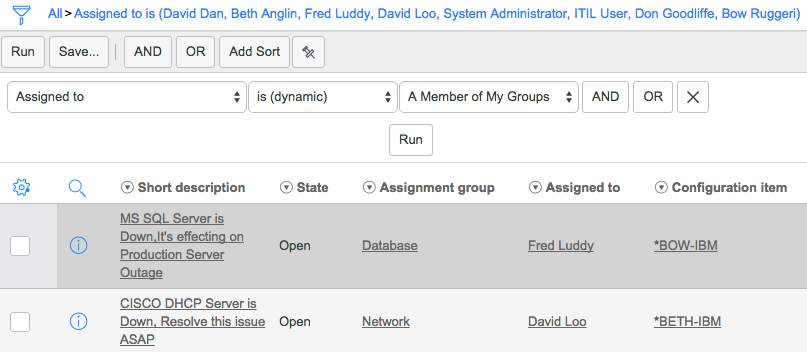
One common filter criteria that I hear about all of the time that isn’t handled out-of-box is to filter for records associated to members of my groups via some user field (usually an assignment or ownership of some sort). Tickets assigned to members of my groups, outstanding approvals for members of my groups, etc. This configuration can be added to your system by following a few simple steps as shown below…
- Create a new ‘On Demand’ Script Include function.
I’ve written about this capability before so you can reference that article for more details if you need. Creating this script include will allow us to easily call a reusable function to return the data we want…in this case a list of users that belong to the same group as the current user. The basic idea for this function is to get a user’s groups, then find the active group members sys_id values associated with those groups and add them to an array to be returned. You can navigate to
‘System Definition -> Script Includes’in your left nav to create this. Don’t forget that the ‘Name’ value of any on demand script include (like this one) needs to exactly match the name of the function you’re calling in the script!
‘getMyGroupMembers’ Script Include
Name: getMyGroupMembers Active: True Client callable: True Description: Queries for members of groups that the currently logged-in user is also a memer of. Script:
function getMyGroupMembers(){
    var myGroups = gs.getUser().getMyGroups();
    var groupsArray = new Array();
    var it = myGroups.iterator();
    var i=0;
    var groupMemberArray = new Array();
    while(it.hasNext()){
        var myGroup = it.next();
        //Query for group members
        var grMem = new GlideRecord('sys_user_grmember');
        grMem.addQuery('group', myGroup);
        //Only return active users
        grMem.addQuery('user.active', true);
        grMem.query();
        while(grMem.next()){
            //Add to user sys_id to array
            groupMemberArray.push(grMem.user.toString());
        }
        i++;
    }
    return groupMemberArray;
}
- Create a new ‘Dynamic Filter’ record
The on-demand function is great and allows you to easily return the data you want. From any place you can call scripts in the system. This is fantastic for business rules, workflow scripts, etc. but the average user running a report or filtering a list is not going to know (nor should they need to know) the exact syntax and function name to call. This is where Dynamic Filters come in! We can wrap that script call in a friendly label that displays in any filter anywhere in the system so that a normal human being can access it as well. Your dynamic filter for the script above should look just like I’ve shown in the screenshot below. You can create it by navigating to ‘System Definition -> Dynamic Filter Options’

NOTE: One interesting bit of information I discovered while working with dynamic filters is the way that the system handles the encoded query strings for them. You end up with a query string (that you could reuse) that looks like this…
assigned_toDYNAMIC1a570fd90856c200aa4521695cf1eb24
The ‘DYNAMIC’ keyword indicates the use of a dynamic filter, and what follows is the sys_id of the corresponding dynamic filter record.
The end result is a nice, dynamic filter option for filtering where the user listed in a user field is a member of one of your groups! This is just one example of a fantastic capability in ServiceNow. There are lots of other use cases that you can add using this same approach.
3 - Changing the Filter of a List Collector Variable via Client Script
Author: Mark Stanger January 13th, 2010
If you’ve worked with the Service-now.com service catalog much, you’ve probably realized that there are some differences between the service catalog interface and the traditional forms that are used throughout the rest of the tool. The intention of this is to make the experience a little bit better for end users of the system but it also means that you, as an administrator, have to learn a few new tricks to deal with those differences.
One of these differences is the List collector variable. It allows the user to select multiple items from a list of items and optionally filter those items to help in their selection. One of the most common requests I see about this type of variable deals with how to handle the filter at the top of the list collector. Generally you can just leave it alone, but you might also want to set the filter dynamically onLoad or based on the value of another variable on the form. Depending on the situation and the number of items in the list collector table you may want to remove the filter portion completely.
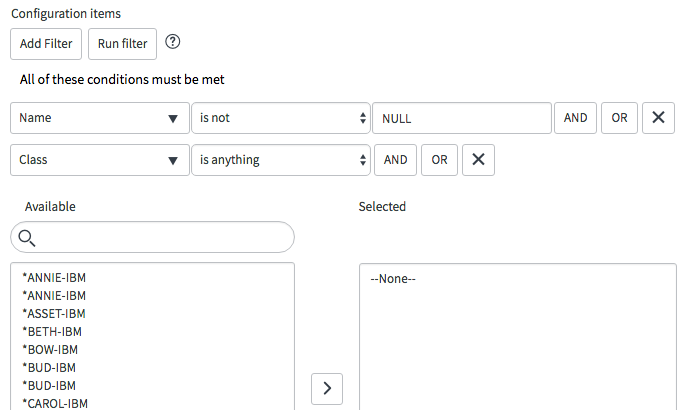
The following Catalog Client Script can be used to set the default filter value for a field and optionally remove the filter completely. It assumes that your List collector variable is named ‘configuration_items’. By default it sets a filter where ‘name != null’ and ‘sys_class_name (CI type)’ is anything. Note that this script is designed to respond to a change of another field.
Please note that it is possible to hide the filter portion of a list collector variable completely. This can be accomplished by adding the ‘no_filter’ attribute to the ‘Attributes’ field on the variable form. The client script method may still be useful if you want to show/hide the filter conditionally however. This also works for Service Portal! Just make sure you set the ‘UI type’ field on the client script form to ‘Both’.
function onChange(control, oldValue, newValue, isLoading) {
    //Apply a filter to the list collector variable
    var collectorName = 'configuration_items';
    var filterString = 'name!=NULL^sys_class_nameANYTHING';

    //Try Service Portal method
    try{
        var myListCollector = g_list.get(collectorName);
        myListCollector.reset();
        myListCollector.setQuery(filterString);
    }
    //Revert to Service Catalog method
    catch(e){
        //Find and hide the filter header elements (optional)
        //Simple method for items with only one list collector
        //$('ep').select('.row')[0].hide();
        //Advanced method for items with more than one list collector (more prone to upgrade failure)
        //var el = $('container_' + g_form.getControl(collectorName).id).select('div.row')[0].hide();

        //Reset the filter query
        window[collectorName + 'g_filter'].reset();
        window[collectorName + 'g_filter'].setQuery(filterString);
        window[collectorName + 'acRequest'](null);
    }
}
Note: If you are trying to filter your list collector in an onLoad script, you have to modify the script so that it waits for the list collector to be rendered before it sets the filter. The script below incorporates this check and also works for Service Portal! Just make sure you set the ‘UI type’ field on the client script form to ‘Both’.
function onLoad() {
    //Apply a default filter to the list collector variable
    var collectorName = 'configuration_items';
    var filterString = 'name!=NULL^sys_class_nameANYTHING';

    //Try Service Portal method
    try{
        var myListCollector = g_list.get(collectorName);
        myListCollector.reset();
        myListCollector.setQuery(filterString);
    }
    //Revert to Service Catalog method
    catch(e){
        //Hide the list collector until we've set the filter
        g_form.setDisplay(collectorName, false);
        setCollectorFilter();
    }

    function setCollectorFilter(){
        //Test if the g_filter property is defined on our list collector.
        //If it hasn't rendered yet, wait 100ms and try again.
        if(typeof(window[collectorName + 'g_filter']) == 'undefined'){
            setTimeout(setCollectorFilter, 100);
            return;
        }
        //Find and hide the filter elements (optional)
        //Simple method for items with only one list collector
        //$('ep').select('.row')[0].hide();
        //Advanced method for items with more than one list collector (more prone to upgrade failure)
        //var el = $('container_' + g_form.getControl(collectorName).id).select('div.row')[0].hide();

        //Reset the filter query
        window[collectorName + 'g_filter'].reset();
        window[collectorName + 'g_filter'].setQuery(filterString);
        window[collectorName + 'acRequest'](null);
        //Redisplay the list collector variable
        g_form.setDisplay(collectorName, true);
    }
}