Service Now
ServiceNow is an American software company based in Santa Clara, California that develops a cloud computing platform to help companies manage digital workflows for enterprise operations, and was also recognized for innovation. Starting out as Glidesoft, the founders created a developer’s workbench to create, maintain and integrate a cloud/web based software to handle both IT and enterprise workflows. Their innovation was not understood in the marketplace. After lacking success selling this developer’s workbench, they decided to use it to produce and application. They created an integrated ITIL (Information Technology Infrastructure Library) service management (ITSM) application to demonstrate their workbench capabilities. The market was hungry for software to handle IT related workflows. It took off and since then they have since branched to other workflows including HR, Legal and IT asset management (ITAM) workflows. This workbench is exellent to create task based workflows by developing code snippets within their framework, all of which is stored as “configuration” style data in a database, including the database definition.
Overview
 Ten years ago, I was skeptical whether "the cloud" would actually emerge as a viable solution. For starters, you ask someone what is "the cloud" and you'll get different answers based on some broad perspective for how they view the use of the term. Ultimately to me, "the cloud" translates into whatever it takes to deliver a managed service by an outside service provider. The key here is on service. Today, that means minimally a server, storage along with the related administrative service for upkeeping the backend (Infrastructure as a Service - IaaS). Taken a step further, there has to be a software service on the frontend, otherwise, there is no use for the service. That software service can also be a part of a cloud offering which also provide administration, development and support (Software as a Service - SaaS) that the client may or may not maintain its configuration.
ServiceNow is an interesting offering in that it is a combination of IaaS and SaaS, whose infrastructure is dynamically redundant over 4 instances with software running on top of their managed infrastructure supporting mainly service management functionality aimed at both IT as well as other business service functions. ServiceNow is a current market leader in “the cloud” space providing an Iaas/SaaS solution to business.
When ServiceNow began as solely a developmental framework where they innovatively created a foundational UI and utility set which provides a consistent method for reading a comprehensive set of configuration rules in terms of database data definition and data rules but includes predominantly javascript code for managing the data and functional service on both the client and server. It was originally brought to market as a simplified web development tool for developers to develop over in order for the developer to focus on functionality rather than being distracted by recreating a utility UI. Not having much success selling it as a dev tool, they needed a use case in order to better market the system’s capabilities. First implementation of ServiceNow was over ITIL support. It was this demonstration implementation that brought success to ServiceNow.
This section highlights work and thoughts related to application architecture and development over the ServiceNow framework. This development framework uses the Glide system that has set the standard for other cloud service providers to play catch up in terms of robust utility, flexibility which translates into minimal time to implement new applications that fit the enterprise. I have found that I can even use this developmental platform as a communication tool in a requirements gathering meeting to just go ahead and stub out basic data and functional requirements as those requirements are being defined. Sweet!
1 - Administration
Topics for administrating the ServiceNow installation.
1.1 - Managing Base Code and Configuration
ServiceNow provides baseline ITIL functionality as their stock service offering to customers. It’s functionality can be customized to suit your own requirements or be easily extended to provide for other service management functionality that the business needs to manage outside of IT. With the ability to highly customize baseline “out-of-box” functionality, it presents a dilemma when performing a major version upgrade or applying ServiceNow mandated patches (i.e. upgrades with inclusive bug fixes and feature enhancements as a holistic installation package). There is no facility for managing deltas outside of the system for applying major version upgrades/“patch update”. This article discusses the shortcomings and some lessons I have learned in maintaining client facing code in ServiceNow.
Overview
Having inherited an installation performed by SN service division installers/developers, sadly, I was faced with a heavily customized installation. They did commit the level of customization according to the requirement of the client project team. They failed to forewarn what the impact on maintenance would be. Upgrades are mandated on a quarterly basis. It was apparent that though the SN installation developers were highly competent, it was equally apparent that they had not battled the ongoing mandated quarterly upgrades (aka patches). In a company I had worked for, on each upgrade/update effort, there were some 1200 exceptions that are generated out of the upgrade process. These exceptions related to ITIL related applications with a few out of ITAM that came “out-of-box”. After filtering out the exceptions that I didn’t care about such as UI mods, workflows, email templates, there were still some 300+ exceptions that required manual review and remediation over code/configuration difference (e.g. Business Rules or Script Includes).
At the time of this writing, no utility is available that evaluates at a high level, the impact of code change to baseline. Note that these exceptions are only generated over baseline and only appear as a function for performing an upgrade. Any custom extension that was created was not affected since there is no baseline equivalent to compare with. This showed me that creating custom apps were really a good option since baseline is not affected. I also saw that it could be better to possibly consider creating custom ITIL based apps (e.g. Change) in order to better manage baseline and controlling functional enhancement where the business requirements were substantially different than baseline they supplied. The only issue I saw on custom apps was around parsing the DOM hive on a major version upgrade resulting from having to work around a client-side bug that SN had yet to fix. SN seems to regularly change the DOM structure.
Lessons Learned
Here are lessons learned from my experience working with upgrades and managing the code base:
- Maintain adherence to base as close as possible and document in both code and capture the functional/structural deviations and justifications in an architectural style master repository/document. This way others will understand where to look for the skeletons. If your organization is large enough, possibly have a technical review and approval process over justifications on deviations with additional approvals on major deviations.
- If functionality of the baseline installation has to be extensively modified to cover your requirements, extend the tables creating your own custom application. You can always revert back to baseline should SN incorporate your functionality as baseline in the future. (One simple example was in the Aspen release, Change only provided a single CI relationship to a Change Request. It was custom to create and related table of CIs and modify the rulesets for the related table to replace the baseline single relationship. This functionality became baseline in about the Eureka release. It would have been better to extend the task table to provide the extensive deviations from baseline to cover the business requirements.)
- Provide inline documentation as a developmental and administrative standard to explain the deviation and why. This has always seemed rather basic to me, but surprisingly this discipline is not practiced by modern developers.
- Try to move the mod into a custom Script Include or Business Rule that overrides or is executed in concert with baseline. Having separated out custom code at upgrade time helped in cutting down exceptions in future upgrades/updates.
- ServiceNow is not an “end-all” solution for every business need even for service management. If the business process does not conform to the service management functional process flow, don’t try to make underlying core functionality conform to a single use case. Likely, you need to develop it yourself using another developmental framework. I’ve seen how the Service Catalog, which is a basic, generic service management task be perverted and provided limitations over the ability to upgrade and incorporate new generic functionality that the user community desired. This could not be done since it was a structural modification that required all of the Service Catalog to be reworked.
See Recurring Maintenance as an example where it was beneficial to extend baseline and create my own custom app leveraging on the baseline code.
2 - Architecture and General Notes
ServiceNow architecture considerations and other considerations.
Introduction
I’ve worked with the ServiceNow system for about 3 years now. ServiceNow is a combination of a SaaS and IaaS sytem that provides out-of-box functionality for ITIL and general service management functionality.
I’ve worked on development frameworks in older systems of the past. The Glide framework underneath the ServiceNow platform is truly revolutionary for bringing software development into the 21st century. It is well thought out where the developer can concentrate mostly on process rather than re-invent rudimentary code to support application aspects such as navigation and UI form presentation. This is all supplied as part of the core framework. The customer/developer facing elements are stored as configuration elements, including data definition. The customer/developer has no direct access to the backend database. All data definition is stored as meta data using the same semantics into the database as any application developed on top of the platform itself.
Database records are displayed in one of two formats: “list view” where a number of records are viewed in a column/row format and “UI view” where fields on a single record is displayed and possibly a list of related records displayed in the parent record’s view.
Other backend features include a job scheduler, mail server, event handler, integrations using SOAP, REST, incoming email parser, and “runbook”.
2.1 - To "Service Catalog" or Not
The Service Catalog operates as a place where an end user can order something, whether it is physical or a request for service. In its basic form it is presented much like a product and handled as when you buy som e product off of Amazon. Behind the “product” is a workflow attached to process its fulfillment. Service C atalog is a great tool, but not the answer to all situations. This article talks about what it does well an d where it does not fit.
Introduction
In a nutshell, the Service Catalog is a framework that was originally built to simplify creating and presenting products (whether a service or a physical product) from a catalog and attach an execution workflow behind the individual product. The framework mimics the e-commerce “shopping cart” experience such as Amazon. At a company that I used to work for, I was thrown into the aftermath of the initial installation projects that included the Service Catalog to organize and clean up the hurried installation as well as standardize and manage the growth over the ServiceNow service management solution. I saw first hand how not to implement the Service Catalog. So when should you leverage the Service Catalog or roll your own by extending the Task table?
The Service Catalog Framework
The basic process flow of the Service Catalog is to select one or more items the client desires that are added to a “cart”. When the order is submitted, approvals are processed over the entire cart aka the “request”. After this initial approval, the “requested items” begin their respective workflows that handles the particulars for fulfillment of each item ordered. (SN has enhanced functionality a bit to include a “one step” submit process. The same overall workflow is still performed, the customer just doesn’t see the cart.)
This framework works well for physical products selectable from a catalog and placed in a shopping cart. Where you have an intangible service offering, it isn’t so straight forward. At the heart of a service request, it is a task that has a workflow managing its fulfillment. Approvals may or may not be needed. A cart is probably not needed since the customer is only interested in a single service request to be performed. From a developmental standpoint, the question here is whether you extend the Task table for another application or do you create another service catalog item to collect and process a service request?
Some other features to consider from the Service Catalog perspective is whether a service request is intended to be part of a broader process such as new employee provisioning. Reporting is another consideration. In a more recent version, variable reporting was introduced. As of the Fuji release, reporting on variables required open and broad read access to the variables related tables. There is no granularity over read access for reporting. Reporting users would have to be all enabled or not. Depending on the privacy of the information stored as a variable, you may not want to enable variable reporting.
So Do I Roll My Own or Use the Service Catalog?
From practical experience, reporting has traditionally driven whether I extend the Task table or simply configure another service catalog item. I was not comfortable to open access on the variables table so that the basic “itil” roled user could report on variables.
Below are some lessons I learned from contending with a cleanup over the Service Catalog.
- Do not modify the Service Catalog framework itself (namely the business rules) under the Request and Requested Items tables. REPEAT: DO NOT MODIFY THE SERVICE CATALOG FRAMEWORK ITSELF. Use it as it comes. Service Catalog has matured and seems to continue to evolve. Making mods to the SC framework will make it difficult to upgrade and enable new features as the baseline software is enhanced over time.
- Standardize approval workflows. Consider making “template” workflows to get you started on a new workflow, or experiment with subflows to normalize approval workflows.
- Maintain a separate product catalog appropriately for the type of product being offered (e.g. desktop workstations versus software packages versus service offerings). You can create your own product catalog that will help to better organize presentation of catalog items by category or type.
- Avoid “streamlining” by creating a single multi-value variable over a table in which the individual items each require its own fulfillment (e.g. the Configuration Item table for multiple software selection). Approvals have to apply to all items selected and not related to individual items selected. From the workflow automation perspective, it becomes more difficult to manage individual approvals related to each item selected. Take a look here for some information over approval engines.
- If the requirements of the Service Catalog Item doesn’t fit the basic shopping cart experience (i.e. Request with one or more Request Items), each with it’s own workflow process, consider extending the “task table” specifically for that purpose.
One regret I had for using the Service Catalog as the solution was a scenario where an intermediate group took a Requested Item and further defined detail requirements before passing on the request to one of a number of fulfillers depending on another (related) Catalog Item, each requiring a different workflow for fulfillment. I was successful at being able to create another Request/Requested Item and relate the two Requested Items together into one Request out of the primary workflow of the first Requested Item, but was a bit of a mess in managing the two Requested Items in tandem due to one being subordinate to the other though peers. If I had it to do over again, I would have extended the “task table” and rolled my own, possibly creating an independent Request/Requested item for fulfillment and maintain a related list to the custom task table extension.
Other Thoughts
One subject that needs mentioned is the Catalog Task. As of Fuji, Catalog Tasks are a generic task that is subordinate to the Requested Item and initiated and maintained out of the workflow for the Requested Item. There is only a single workflow (or set of workflows with conditions for execution) that can be defined generically for all Catalog Tasks as any other table (except the Catalog Item table) with no regard to any one Catalog/Requested Item. This limits how you develop around the Catalog Task to better manage fulfillment tasks between departments. I would like to see a future enhancement where a configuration table similar to the Catalog Item table that associates a named workflow that is automatically initiated that would provide a specific workflow under a Catalog Task as it would pertain to the related Request Item. As it exists today, you’d have to add a custom attribute to the Catalog Task table for a “category” and condition all workflows based on that category for execution. Since the Catalog Task is generic, more than a few conditional workflows would affect performance as well as become convoluted since its maintenance is over all Catalog Tasks.
2.2 - Creating and Using Subflows in ServiceNow
Subflows are separate workflow activities defined to be executed out of a primary workflow. ServiceNow’s documentation gives the basics on how to create the subflow, but lacks on how to link a subflow to a primary workflow and pass data and return codes back and forth. This article attempts to fill in the gaps you can’t get from SN documentation.
The basics for subflows is documented in this ServiceNow Wiki article.
Notes to bear in mind when defining and using subflows:
- Create the subflow prefaced with “Subflow” in order to distinguish that subflow from a regular workflow. Otherwise you can’t tell in the list whether the workflow is a primary or sub.
- Subflows are available as workflow activities when creating a primary workflow.
- Subflows must be created using the same table as the primary workflow.
- Input fields:
- The fields must be mapped into the record for the table the subflow is created. Must exist in the same context.
- If a literal, no quotes needed.
- The workflow scratchpad in the primary workflow is not shared with the subflow and vice versa.
- Data is received as “input fields”.
- Data is returned using “return codes”.
- If scratchpad variable is used for receiving a “return code”, it must be initialized before being referenced in the Return Code activity.
- Return codes:
- Can return a string (or in the form of a Javascript $() style variable).
- Literals do not need quoting.
- Change considerations:
- Subflows are dynamically executed. Tasks already in process will execute the current subflow when called unless the subflow is already in execution mode (i.e. already attached to the task).
- Workflows are statically executed. Tasks already in process will execute the legacy workflow since it is already in progress.
Example: A simple catalog item is created with a workflow associated that calls a subflow to return whether a manager’s name begins with the letter “A”. The return from the subflow would be either “yes” or “no”. This functionality would be referenced in this catalog item and others as a standard validation on other catalog items that have their own unique workflow, but requiring the same “A” validation on the manager’s name.
The system property “glide.workflow.enable_input_variables” must be set to true in order to enable input variables in subflows.
2.3 - Working with Dates in ServiceNow
One would think that the date/time data type would be cut and dry in terms of computing. After all, programming around date/time has been a feature since the early days of digital computer systems. ServiceNow has to provide backend utilities to perform this translation since the developer cannot reach into the web server backend. Though SN has a collection of date/time utilities, they are scant on formatting and calculation options. You have to roll your own to compensate using the Glide library functions that SN makes available to the developer for translating a system or database stored time into a constant, generic format. This article provides an example for how to create your own date/time utility utilizing the Glide library date/time functions.
Introduction
Different operating systems handles date/time using different standards. Databases stores date/time using even differing standards than the OS. Aside from storing and interpreting a constant date/time, formatting the presentation can be onerous. Remember the Y2K dilemma? In terms of open systems, date/time has been a non-event all the way around. The value stored is the number of seconds past “epoch” (i.e. January 1, 1970) in Universal Time Code (i.e. Greenwich Meantime) and converted depending on the timezone specified in the computing environment the host is running. Since this is expressed in integer form, time runs out, so to speak in January 2038. Databases have their own epoch/integer system for storing date/time. A translator to interpret a date/time is needed to present a date/time in various formats.
Use Case
On one application that I had to build, only the date itself was needed. Defining the data dictionary was no big deal since the field was definable as a “date only”. In calculating date differences in a Business Rule, I had to role my own utilities for calculating and storing differences between two dates since the Glide calls only serviced date/time. Below are some basic Javascript functional objects for working with date/time and passing the result to the client via Ajax. Some are mine, some are from various sources made available in the SN community that I have collected. The functionality is self documenting.
var AjaxUtils = Class.create();

AjaxUtils.prototype = Object.extendsObject(AbstractAjaxProcessor, {

        calcDateDiff : function(start_date, end_date) {
		// This method calculates on whole days.
		// The "start day" counts as 1 day.

		var createdate = new GlideDateTime();
		var enddate = new GlideDateTime();

		// The current day is used for the endDate calculation if not provided.
		if (typeof(start_date) == 'undefined') {
			if (this.getParameter('sysparm_start_date')) {
				start_date = this.getParameter('sysparm_start_date');
			} else {
				start_date = gs.now();
			}
		}
		if (typeof(end_date) == 'undefined') {
			if (this.getParameter('sysparm_end_date')) {
				end_date = this.getParameter('sysparm_end_date');
			} else {
				end_date = gs.now();
			}
		}

		createdate.setDisplayValueInternal(start_date + ' 00:00:00');
		enddate.setDisplayValueInternal(end_date + ' 00:00:00');

		var variance = parseInt(gs.dateDiff(createdate.getDisplayValue(), enddate.getDisplayValue()).replace(/ .*/, '') );
		variance += 1;


		return variance.toString();

	},

	checkEndDate : function(startDate, endDate) {
		if(typeof(startDate) == 'undefined') {
			//startDate = new Packages.com.glide.glideobject.GlideDateTime();
			//startDate.setDisplayValue(this.getParameter('sysparm_start_date'));
			startDate = this.getParameter('sysparm_start_date');
		}
		if(typeof(endDate) == 'undefined') {
			//endDate = new Packages.com.glide.glideobject.GlideDateTime();
			//endDate.setDisplayValue(this.getParameter('sysparm_end_date'));
			endDate = this.getParameter('sysparm_end_date');
		}
		//gs.log('here:\n' + startDate + '\n' + endDate + '\n' + gs.dateDiff(startDate, endDate, true));
		return(gs.dateDiff(startDate, endDate, true) >= 0);
	},

	returnLeadTimeInDays : function(startDate) {
		var startDateTmp = new GlideDate();
		startDateTmp.setDisplayValue(startDate);

		var msStart = startDateTmp.getNumericValue();
		var msNow = new GlideDate().getNumericValue();
		var msDiff = msStart - msNow;
		var dayDiff = Math.floor(msDiff / 86400000);

		return(dayDiff);
	},


	checkLeadTime : function(startDate, leadTime) {
		startDate = new GlideDateTime();
		startDate.setDisplayValue(this.getParameter('sysparm_start_date'));
		leadTime = parseInt(this.getParameter('sysparm_lead_time'));

		var msStart = startDate.getNumericValue();
		var msNow = new GlideDateTime().getNumericValue();
		var msDiff = msStart - msNow;
		var dayDiff = Math.floor(msDiff / 86400000);

		return(dayDiff >= leadTime);
	},

	dateInFuture : function() {
		//Returns true if date is before now, and false if it is after now.
		var firstDT = this.getParameter('sysparm_fdt'); //Date-Time Field
		var diff = gs.dateDiff(firstDT, gs.nowDateTime(), true);
		var answer = '';
		new_diff = Math.floor(diff / 86400);
		if (new_diff >= 0){
			answer = 'true';
		} else {
			answer = 'false';
		}
		return answer;
	},

	dateInPast : function(firstDT) {
		//Returns true if date is before today, and false if it is today or later.
		if (typeof(firstDT) == 'undefined') {
			firstDT = this.getParameter('sysparm_fdt'); //Date-Time Field
		}
		var diff = gs.dateDiff(firstDT, gs.nowDateTime(), true);
		var answer = '';
		new_diff = Math.floor(diff / 86400);
		if (new_diff > 0){
			answer = 'true';
		} else {
			answer = 'false';
		}
		return answer;
	},

	date_timeInPast : function(firstDT) {
		//Returns true if date is before today, and false if it is today or later.
		if (typeof(firstDT) == 'undefined') {
			firstDT = this.getParameter('sysparm_fdt'); //Date-Time Field
		}
		var diff = gs.dateDiff(firstDT, gs.nowDateTime(), true);
		var answer = '';
		new_diff = Math.floor(diff / 60);
		if (new_diff > 0){
			answer = 'true';
		} else {
			answer = 'false';
		}
		return answer;
	},  type: "AjaxUtils"
});
3 - Development Projects
3.1 - Recurring Maintenance
Articles here are related to recurring maintenance activities inside ServiceNow.
Introduction
I prefer to enable others appropriately to be able to get their job done. The last thing I prefer is being the bottleneck for anyone to get their job done. That is the reason why I’m passionate about IT right?
The company I was working for was on the “Dublin” release when in a short amount of time 3 groups wanted to be able to set up maintenance schedules to perform various types of routine inspections. I looked at the Planned Maintenance application for whether it could be used cooperatively by different user groups and have the capacity to partition and maintain each group’s schedule by location. In Dublin, you were constrained by targeting configuration items (CIs) and it only serviced one single user group - i.e. IT operations.
Being fascinated with how the job scheduler was constructed, I set out to see how I could create extensions off of the job scheduler for other purposes than general ServiceNow operations and be able to delegate schedule administration. Using this use case scenario and the existing monolithic scheduler as a base to extend and provide the needed delegation to operational admins. The details are shown below in the “Presentation to Houston SNUG” over how I did this.
References below are for the articles I used and a presentation I made to share using the scheduler in what we called “IT Facilities”:
4 - Interesting Techniques by Others
Here are some articles I found that were innovative solutions developing over ServiceNow.
4.1 - Dynamically Adding Variables to a Request Item
Posted on November 21, 2014 by Bill Mitlehner
http://www.snrevealed.com/2014/11/21/dynamically-adding-variables-to-a-request-item/
Whatever your reasons may be, there may come a time when you need to dynamically add an additional variable to a request item after the original request has been entered by the user. This could be for populating additional information that is not available at the time the request is made or if you are breaking up a single request that contains a list into multiple individual requests that can be operated on individually.
The challenge with doing this is that there is a relationship between four different tables that needs to be setup to ensure that the variable is associated with the request properly. At the top is the Request Item table itself (sc_req_item). Ultimately, this is where the variables will be referenced on any subsequent form displays. The other three tables create the relationship between the request item, the questions and the answers. These other tables are sc_item_option_mtom, item_option_new and sc_item_option.
Working backwards, we ultimately need to build up the relationship between the request item and answers associated with the particular request item. Capturing this relationship is the responsibility of the sc_item_option_mtom table. The sc_item_option_mtom table is a many-to-many table that has an entry that relates every single answer (sc_item_option) to its respective request item (sc_req_item). (You can review many to many relationships in the ServiceNow wiki). In addition, each entry in the Answer tables (sc_item_option) has a reference to the particular question it answers (item_option_new).
To formalize this, I’ve put together a bit code that takes a request item, variable name, variable value and (optionally) a catalog item to associate a question and answer to a particular request item.
function addOptions(reqItemID, varName, varValue, catItem)
// Get a reference to the request item table using the sys_id of the request item
var gr_item = new GlideRecord(‘sc_req_item’);
gr_item.addQuery(‘sys_id’, reqItemID);
gr_item.query();

// Assuming we found a matching request…
if (gr_item.next()) {
// Find the correct question
var gr_option = new GlideRecord(‘item_option_new’);
gr_options.addQuery(‘name’, varName);
// If the question is associated with a catalog item, keep that relationship
if (catItem != ”) gr_options.addQuery(‘cat_item’, catItem);
gr_options.query();
// If we found a matching question…
if (gr_options.next()) {
// Get a reference to the answers table and insert a new answer
var gr_answers = new GlideRecord(‘sc_item_option’);
gr_answsers.initialize();
gr_answers.item_option_new = gr_options.sys_id;  // Map the answer to its question
gr_answers.value = varValue;
gr_answers.insert();  // Insert the record
// Now build the relationship between the answer and the request item
var gr_m2m = new GlideRecord(‘sc_item_option_mtom’);
gr_m2m.initialize();
gr_m2m.sc_item_option = gr_answers.sys_id;
gr_m2m.request_item = reqItemID;
gr_m2m.insert();  // Create the new relationship
}
}
}
4.2 - Harnessing the Power of Dynamic Filters in ServiceNow
Author: Mark Stanger September 4th, 2015
https://servicenowguru.com/system-definition/harnessing-power-dynamic-filters-servicenow/
ServiceNow adds a ton of great functionality to each new product release. Often times, the most helpful and useful features (at least to a long-time user of the system) are enhancements to simplify or improve on existing functionality. Unfortunately, these are often some of the most under-appreciated and end up getting lost in the marketing hype of all of the brand new capabilities that you may or may not use. One such example that recently arrived to ServiceNow is ‘Dynamic filters’. In this post, I’ll share what dynamic filters are, and show how you can extend and leverage this capability to improve your own ServiceNow system.

The ServiceNow wiki does a decent job of explaining the basic concept and usage of dynamic filters. There are 1000’s of scenarios where users of the system need to query for information, display a list of data, generate a report, or values from a reference field based on a specific, logical filter criteria. There are many examples of this…my Group’s work, my approvals, records assigned to other members of my groups, etc. These types of scenarios, though simple on the surface, actually require sometimes very complex code to query for and return the correct data. ServiceNow has always allowed you to do this, of course, but the approach (asking a typical end-user to remember and correctly populate a specific query string with a function call directly in the filter) really isn’t one that works well — even if that user happens to be an admin of the system. Those query strings generally look something like this and can be pasted directly into any filter criteria to return information…
javascript:gs.getUserID();
javascript:getRoledUsers();
etc...
The general idea behind dynamic filters is to allow a ServiceNow administrator to pre-define the filter query logic to return the correct information from a back-end function, then set up a dynamic filter definition to point to that information via a simple label invoked from any filter field criteria in the system. These dynamic filters can be as flexible and complex as you need them to be, but the end-user doesn’t need to know or understand any of that complexity in order to benefit from them!
There are several of these dynamic filters defined out-of-box that you can use right away as examples for creating your own. You can find them under ‘System Definition -> Dynamic Filter Options’ in your left nav. For more complex scenarios, you’ll actually point your dynamic filter to a back-end Script Include function that contains all of the logic and does the heavy lifting.
One common filter criteria that I hear about all of the time that isn’t handled out-of-box is to filter for records associated to members of my groups via some user field (usually an assignment or ownership of some sort). Tickets assigned to members of my groups, outstanding approvals for members of my groups, etc. This configuration can be added to your system by following a few simple steps as shown below…
- Create a new ‘On Demand’ Script Include function.
I’ve written about this capability before so you can reference that article for more details if you need. Creating this script include will allow us to easily call a reusable function to return the data we want…in this case a list of users that belong to the same group as the current user. The basic idea for this function is to get a user’s groups, then find the active group members sys_id values associated with those groups and add them to an array to be returned. You can navigate to
‘System Definition -> Script Includes’ in your left nav to create this. Don’t forget that the ‘Name’ value of any on demand script include (like this one) needs to exactly match the name of the function you’re calling in the script!
‘getMyGroupMembers’ Script Include
Name: getMyGroupMembers
Active: True
Client callable: True
Description: Queries for members of groups that the currently logged-in user is also a memer of.
Script:
function getMyGroupMembers(){
    var myGroups = gs.getUser().getMyGroups();
    var groupsArray = new Array();
    var it = myGroups.iterator();
    var i=0;
    var groupMemberArray = new Array();
    while(it.hasNext()){
        var myGroup = it.next();
        //Query for group members
        var grMem = new GlideRecord('sys_user_grmember');
        grMem.addQuery('group', myGroup);
        //Only return active users
        grMem.addQuery('user.active', true);
        grMem.query();
        while(grMem.next()){
            //Add to user sys_id to array
            groupMemberArray.push(grMem.user.toString());
        }
        i++;
    }
    return groupMemberArray;
}
- Create a new ‘Dynamic Filter’ record
The on-demand function is great and allows you to easily return the data you want. From any place you can call scripts in the system. This is fantastic for business rules, workflow scripts, etc. but the average user running a report or filtering a list is not going to know (nor should they need to know) the exact syntax and function name to call. This is where Dynamic Filters come in! We can wrap that script call in a friendly label that displays in any filter anywhere in the system so that a normal human being can access it as well. Your dynamic filter for the script above should look just like I’ve shown in the screenshot below. You can create it by navigating to ‘System Definition -> Dynamic Filter Options’

NOTE: One interesting bit of information I discovered while working with dynamic filters is the way that the system handles the encoded query strings for them. You end up with a query string (that you could reuse) that looks like this…
assigned_toDYNAMIC1a570fd90856c200aa4521695cf1eb24
The ‘DYNAMIC’ keyword indicates the use of a dynamic filter, and what follows is the sys_id of the corresponding dynamic filter record.
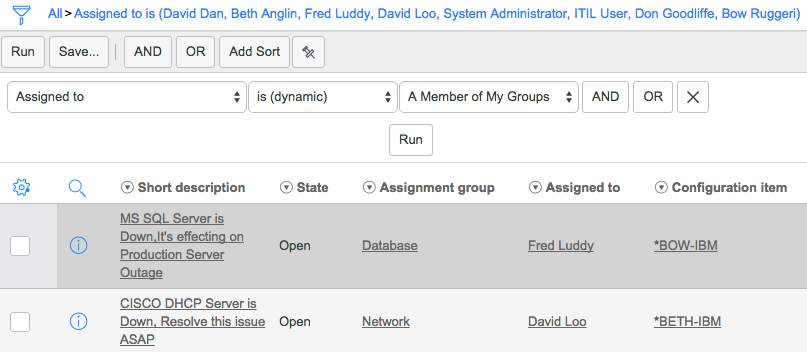
The end result is a nice, dynamic filter option for filtering where the user listed in a user field is a member of one of your groups! This is just one example of a fantastic capability in ServiceNow. There are lots of other use cases that you can add using this same approach.
4.3 - Changing the Filter of a List Collector Variable via Client Script
Author: Mark Stanger January 13th, 2010
https://servicenowguru.com/scripting/client-scripts-scripting/changing-filter-list-collector-variable-client-script/
If you’ve worked with the Service-now.com service catalog much, you’ve probably realized that there are some differences between the service catalog interface and the traditional forms that are used throughout the rest of the tool. The intention of this is to make the experience a little bit better for end users of the system but it also means that you, as an administrator, have to learn a few new tricks to deal with those differences.
One of these differences is the List collector variable. It allows the user to select multiple items from a list of items and optionally filter those items to help in their selection. One of the most common requests I see about this type of variable deals with how to handle the filter at the top of the list collector. Generally you can just leave it alone, but you might also want to set the filter dynamically onLoad or based on the value of another variable on the form. Depending on the situation and the number of items in the list collector table you may want to remove the filter portion completely.
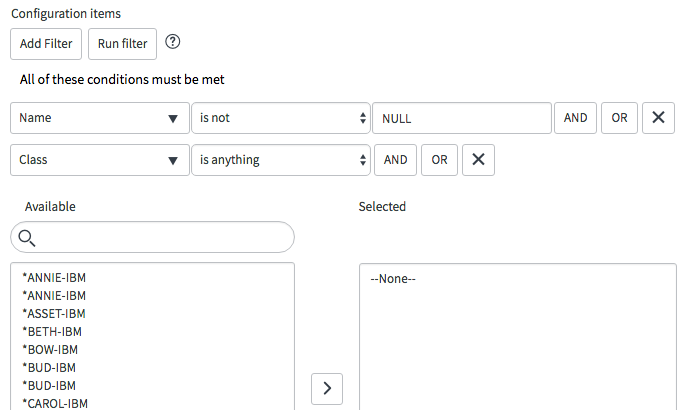
The following Catalog Client Script can be used to set the default filter value for a field and optionally remove the filter completely. It assumes that your List collector variable is named ‘configuration_items’. By default it sets a filter where ‘name != null’ and ‘sys_class_name (CI type)’ is anything. Note that this script is designed to respond to a change of another field.
Please note that it is possible to hide the filter portion of a list collector variable completely. This can be accomplished by adding the ‘no_filter’ attribute to the ‘Attributes’ field on the variable form. The client script method may still be useful if you want to show/hide the filter conditionally however. This also works for Service Portal! Just make sure you set the ‘UI type’ field on the client script form to ‘Both’.
function onChange(control, oldValue, newValue, isLoading) {
    //Apply a filter to the list collector variable
    var collectorName = 'configuration_items';
    var filterString = 'name!=NULL^sys_class_nameANYTHING';

    //Try Service Portal method
    try{
        var myListCollector = g_list.get(collectorName);
        myListCollector.reset();
        myListCollector.setQuery(filterString);
    }
    //Revert to Service Catalog method
    catch(e){
        //Find and hide the filter header elements (optional)
        //Simple method for items with only one list collector
        //$('ep').select('.row')[0].hide();
        //Advanced method for items with more than one list collector (more prone to upgrade failure)
        //var el = $('container_' + g_form.getControl(collectorName).id).select('div.row')[0].hide();

        //Reset the filter query
        window[collectorName + 'g_filter'].reset();
        window[collectorName + 'g_filter'].setQuery(filterString);
        window[collectorName + 'acRequest'](null);
    }
}
Note: If you are trying to filter your list collector in an onLoad script, you have to modify the script so that it waits for the list collector to be rendered before it sets the filter. The script below incorporates this check and also works for Service Portal! Just make sure you set the ‘UI type’ field on the client script form to ‘Both’.
function onLoad() {
    //Apply a default filter to the list collector variable
    var collectorName = 'configuration_items';
    var filterString = 'name!=NULL^sys_class_nameANYTHING';

    //Try Service Portal method
    try{
        var myListCollector = g_list.get(collectorName);
        myListCollector.reset();
        myListCollector.setQuery(filterString);
    }
    //Revert to Service Catalog method
    catch(e){
        //Hide the list collector until we've set the filter
        g_form.setDisplay(collectorName, false);
        setCollectorFilter();
    }

    function setCollectorFilter(){
        //Test if the g_filter property is defined on our list collector.
        //If it hasn't rendered yet, wait 100ms and try again.
        if(typeof(window[collectorName + 'g_filter']) == 'undefined'){
            setTimeout(setCollectorFilter, 100);
            return;
        }
        //Find and hide the filter elements (optional)
        //Simple method for items with only one list collector
        //$('ep').select('.row')[0].hide();
        //Advanced method for items with more than one list collector (more prone to upgrade failure)
        //var el = $('container_' + g_form.getControl(collectorName).id).select('div.row')[0].hide();

        //Reset the filter query
        window[collectorName + 'g_filter'].reset();
        window[collectorName + 'g_filter'].setQuery(filterString);
        window[collectorName + 'acRequest'](null);
        //Redisplay the list collector variable
        g_form.setDisplay(collectorName, true);
    }
}