Network Based Administration
This section provides thoughts over the basics in designing a network based computing environment that require the fewest number of administrators to manage it.
Configuration Management
Configuration design and definition is at the core of good network architecture. I have experimented with what configuration elements are important, which should be shared and which should be maintained locally on each host. Whether an instance is virtual, physical or a container, these concepts apply universally.
Traditionally, there was a lot of apprehension to share both application and configuration over a network much less share application accessible data. I guess this comes from either people who cannot think 3 dimensionally or those whose background is solely administrating a Windows network of which the design has morphed from a limited stand-alone host architecture. Realistically today, if there was no network, we’d not be able to do much anyway. Developing a sustainable architecture surrounding the UNIX/Linux network is efficient and manageable. Managing security is a separate topic for discussion.
The first step in managing a network of open system computers is to establish a federated name service with the purpose of managing user accounts and groups as well as provide a common reference repository for other information. I have leveraged NIS, NIS+ and LDAP as name service through the years. I favor LDAP since the directory server provides a better system for redundancy and service delivery, particularly on a global network. MS Windows Active Directory can be made to work on UNIX/Linux hosts by enabling SSL, make some security rule changes and adding the schema supporting open systems. The downside to Active Directory compared to a Netscape based directory service is managing the schema. On Active Directory, once the schema has been extended, you cannot rescind the schema unless you rebuild the entire installation from scratch. To date, I have yet to find another standardized directory service that will accomodate the deviations that Active Directory provide an MS network.
In a shop where there are multiple flavors of open systems, there have been ways that I have leveraged automounter to store binaries that are shared on a given OS platform/version. Leveraging on NAS storage such as Netapp, replication can be performed across administrative centers that can be used universally and maintained from one host. For the 5 hosts I maintain at home, I have found TruNAS Core (formerly FreeNAS) to be a good opensource solution to deliver shared data to my Linux and OSX hosts.
Common Enterprise-Wide File System Taxonomy
The most cumbersome activity toward setting up a holistic network is deciding on what utilities and software is to be shared across the network from a single source. Depending on the flavor, the path to the binary will be different. Further, the version won’t be consistent between OS versions or platform. Having a common share to provide for scripting languages such as Perl or Python help to provide a single path to reference in scripting, including plugin inclusion. It requires some knowledge on how to compile and install opensource software. More architectural discussion is included in the article User Profile and Environment over how to manage the same look and feel though different over the network.
Along with managing application software across a network, logically the user home directory has to be shared from a NAS. Since the user profile is stored in the home directory, it has to be standardized generically to function on all platforms and possibly versions. Decisions are needed for ordering the PATH and whether structure is needed in the profile to extend functionality to provide for user customizations or local versus global network environments. At a minimum, the stock user profile must be unified so that it can be managed consistently over all the user community, possibly with the exception of application software related administration accounts that are specific to the installation of a single application.
Document, Document, Document!
Lastly, it is important to document architecture and set standards for maintaining a holistic network as well as provide a guide to all administrators that will provide consistency in practice.
These links below provide more detail toward what I have proven in architecting and deployment of a consistent network of open systems.
1 - Federated Name Services - LDAP
Federated name services have evolved through the years. Currently LDAP is the current protocol driven service that has replaced legacy services such as NIS and NIS+. There are many guides over what is LDAP and how to implement LDAP directory services. This article discusses about how to leverage LDAP for access control in a network of open system hosts with multiple user and admin groups in the enterprise.
Introduction
What is a Federated Name Service? In a nutshell, it is a service that is organized by types of reference information such as in a library. There are books in the library of all different types and categories. You select the book off the shelf that best suits your needs and read the information. The “books” in an LDAP directory are small bits of data that is stored in a database on the backend and presented in a categorical/hierarchical form. This data is generally written once and read many times. This article is relative to open systems, I will write another article over managing LDAP services on Microsoft’s Active Directory that can also service open systems.
Design Considerations
Areas for design beyond account and user groups, are for common maps such as host registration supporting Kerberos or for registering MAC addresses that can be used as a reference point for imaging a host and setting the hostname. Another common use is for a central definition of automount maps. Depending on how one prefers to manage the directory tree, organizing separate trees that support administration centers that house shared data made the most sense to me with all accounts and groups stored in a separate, non-location based tree.
A challenge with open systems and LDAP is how to manage who can log in where. For instance, you don’t want end users to log into a server when they only need to consume a port based service delivered externally to that host. Possibly on a server, you may need to see all the users of that community but not allow them to login. This form of “security” can be managed simply by configuring both the LDAP client and the LDAP directory to match on a defined object’s value.
To provide an example, let’s suppose our community of users comprised of Joe, Bob, Mary, and Ellen. Joe is the site administrator and should have universal access to all hosts. Bob is member of the marketing team where Mary is an application administrator for the marketing team and Ellen is a member of the accounting team.
On the LDAP directory, you’ll need to use an existing object class/attribute or define a new one that will be used to give identity to the “access and identity rights”. If you are leveraging off of an existing defined attribute, that attribute has to be defined as a multi-value attribute since one person may need to be given multiple access identities. For the sake of this discussion, let’s say we add a custom class and the attribute “teamIdentity” to handle access and identity matching that is also added to the user objects (user objects can be configured to include multiple object classes as long as they have a common attribute such as cn).
On the client side, you will be creating a configuration to bind and determine which name service maps will be used out of the directory service. As a part of the client configuration, you can create an LDAP filter that is used when client queries the directory service to only return information that passes the filter criteria. So included in mapping what directory server and what the basedn and leaf for making a concise query into the directory should be, you append a filter that designates further filters a single or multiple matches on an attribute/value pair. For user configuration, there are two configuration types to define: user and shadow databases. The “user” is used to configure for “who should be visible as a user” on the host. The “shadow” is used to configure for who can actually login directly to the host. When the NSS service operates locally on the host, its local database cache will contain the match of users according to the common data values matched between the directory server and the client configuration and filter object/attribute/values. The challenge here is more on functional design around what values are created and for what purpose do they serve. Another custom class may be wise to put definition and ultimately control around what attribute values can be added to the user object. Unless you create definition and rules in your provisioning process, any value (intended, typo, etc.) can be entered.
To bring together this example, let’s suppose that this is the directory definition and content around our user community:
| User/Object |
teamIdentity/Value |
| Joe |
admin |
| Bob |
marketing-user |
| Mary |
marketing-sme |
| Ellen |
accounting-user |
| John |
marketing |
Let’s say we have these servers configured as such:
| Server (LDAP Client) |
Purpose |
Client Filter - Passwd |
Client Filter - Shadow |
| host01 |
Network Monitoring |
objectclass=posixAccount |
objectclass=posixAccount,objectclass=mycustom,teamIdentity=admin |
| host02 |
Marketing Services |
objectclass=posixAccount,objectclass=mycustom,teamIdentity=admin,teamIdentity=marketing-user,teamIdentity=marketing-sme |
objectclass=posixAccount,objectclass=mycustom,teamIdentity=admin,teamIdentity=marketing-sme |
| host03 |
Accounting Services |
objectclass=posixAccount,objectclass=mycustom,teamIdentity=admin,teamIdentity=accounting-user |
objectclass=posixAccount,objectclass=mycustom,teamIdentity=admin,teamIdentity=accounting-sme |
Here is how each user defined in the directory server will be handled on the client host:
| Server (LDAP Client) |
Identifiable as a User |
Able to Login |
| host01 |
Everyone |
Joe only |
| host02 |
Joe, Bob, Mary |
Joe, Mary |
| host03 |
Joe, Ellen |
Joe |
Notice that for host03, there was a “teamIdentity=accounting-sme” defined as part of the filter. Since Ellen exists in the directory service with the attribute “accounting-user” assigned, she will be visible as a user, but not able to login. Conversely, if there was a user in the directory service configured for the “teamIdentity=accounting-sme”, they would not be able to log in since you have to be identifiable as a user before you can authenticate. One last observation, John is configured for “teamIdentity=marketing”. Since that value is not configured in the client filter, John will not be identifiable or able to login to host02.
For more information over the LDIF syntax see Oracle documentation. For more information over client configuration, you’ll have to dig that out of the administration documentation for your particular platform/distro.
2 - User Profile and Environment
This article discusses considerations in designing and configuring a user profile supporting the OS and application environments. There are different aspects to consider in tailoring the user environment to operate holistically in an open systems network. One major architectural difference between open systems and MS Windows is that applications, for the most part are dependent on a local registry database that a packaged application plants its configuration. Historically with traditional UNIX environments, there is only a text file that contains it’s configuration information, whether a set of key/value pairs or a simple shell file assigning values to variables.
Overview
More modern versions of UNIX, including Linux has implemented a packaging system in order to inventory locally installed OS and software components. These systems only store meta data as opposed to being a repository for configuration data that provides structure for the inventory of software installed and related dependencies. Overall, there is no “registry” per se as in a Windows environment where the local registry is required. Execution is solely dependent on a binary being executed through the shell environment. The binary can be stored locally or on a network share and effectively be executable. The argument against this execution architecture is over control and security for applications running off a given host since realistically a user can store an executable in their own home directory and execute it from that personal location. This can be controlled to a certain extent though not completely by restricting access to compilers, the filesystem and means to external storage devices.
Consideration for architecting the overall operating environment can be categorized in these areas:
- Application or service running on the local host and stored somewhere
- OS or variants due to the OS layout and installation
- Aspects directly related to work teams
- Aspects related to the personal user computing experience.
Each of these areas need to be a part of an overall design for managing the operating environment and user experience working in the operating environment.
Application Environment
The most easily is managing the application environment. The scope is fairly narrow and particular to a single application to execute on a single host. Since there is no common standard around setting the process environment and launching an application, there is a need for the application administrator to establish a standard for managing how the environment is set and launched - i.e. provide a wrapper script around each application, executed from a common script directory. With purchased applications, they may or may not provide context around their own wrapper. Having a common execution point makes it easier to administrate, particularly when there is software integrated with others. I’ve seen some creative techniques where a single wrapper script is used that sources its environment based on an input parameter on the wrapper script. These generally, though logical, become complicated since there are as many variations for handling the launch of an application as there are application developers.
All OS’s have a central shell profile ingrained into the OS itself depending on the shell. I have found that it is best to leave these alone. Any variations that is particular to the OS environment due to non-OS installation on the local host needs to be managed separately and that aspect is factored into the overall user or application execution environment. Another kink with managing a network of varying OS variants is providing a single profile that compensates for the differences between OSs. For example a common command might be located in /usr/bin on one OS variant but exist in /opt/sfw/bin on another. Based on the OS variant, the execution path would need to factor in those aspects that are unique to that variant.
Work teams may have a common set of environment elements that are particular only to their group but should be universal to all members of that team. This is another aspect to factor into the overall profile management.
User Profile and Environment
Finally, the individual user has certain preferences such as aliases they desire to define and use that apply only to themselves. From a user provisioning standpoint, a template is used to create the user oriented profile. The difficulty is in the administration of a network of users who all wind up with their own version of the template first provisioned into their home directory. This complicates desktop support as profiles are corrupted or become stale with the passage of time. I have found it wise to provide a policy surrounding maintaining a pristine copy of the templated profile in the user’s home directory but provide a user exit to source a private profile where they can supplement the execution path or set aliases. A scheduled job can be run to enforce compliance here but only after the policy is adopted and formalized with the user community.
Architecture and Implementation
The best overall architecture that I have wound up with is a layered approach with a set priority that provides for more granular the precedence based on how far down the priority stack of execution. In essence, the lower down the chain, the greater influence that layer has on the final environment going from the macro to the micro. Here are some diagrams to illustrate this approach.
Logical Architecture
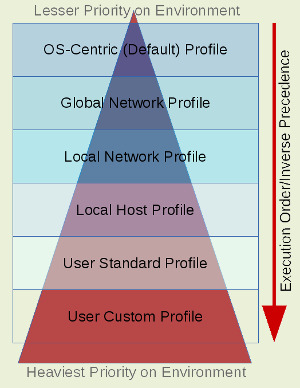
Execution Order

The profile is first established by the OS defined profile whose file that is sourced is compiled into the shell binary itself. The location of this file varies according to the OS variant and how the shell is configured for compilation. The default user-centric profile is located in the home directory using the same hidden file name across all OS variants. It is the user profile file that is the center for constructing and executing the precedence stack. With each layer, the last profile pragmatically will override the prior layer as indicated in the “Logical” diagram. Generally there is little need for the “Local Host Profile”. It is optional and only needed when on a standardized location on the local host a profile is created (e.g. /usr/local/etc/profile).
See the next article “Homogenized Utility Sets” for more information surrounding the “Global” and “Local” network file locations and their purpose. This will give perspective around these shared filesystems.
3 - Homogenized Utility Sets
An article that talks about utilities that can be shared between all open system variants, the difficulties to watch out for and elements to consider in the design. Ultimately a shared file system layout is needed that presents a single look and feel across multiple platforms but leverages off of a name service and the use of “tokens” embeded in the automount maps to mount platform specific binaries according to the local platform. This article is complimentary to the previous article “User Profile and Environment”. Topics include: Which Shell?, Utilities and Managing Open Source.
Which Shell?
In short, CSH (aka C Shell) and its variants aren’t worth messing with unless absolutely coerced. I have found explainable and repeatable bugs that make no sense with CSH. There is quite a choice for Bourne shell variants. I look for the lowest common equivalent between the OS variants.
KSH (aka Korn Shell) is a likely candidate since it has extended functionality beyond the Bourne Shell, but is difficult to implement since there are several versions across platforms. Those extended features make it difficult to code one shell script to be used across all platforms.
I have found that Bash is the most widely supported at the same major version that can be compatibly used out-of-box across the network. The last thing I would care to do is re-invent the wheel of a basic foundational component of the OS. It is suitable for the default user shell as well as a rich enough function set for shell scripting.
Utilities
Working with more than one OS variant will present issues for providing consistent utilities such as Perl, Python, Sudo, etc. since these essential tools are at various obsolete versions out of box. As well as managing a consistent set of plugin modules can be difficult to maintain (e.g. Perl and Python), especially when loaded on each individual host in the network. I have found it prudent to download the source for these utility software along with desirable modules that provide extended utility and compile them into a shared file system per platform type and version. The rule of thumb here is if all your OS variants sufficiently support an out-of-box version, then use the default; if not, compile it and manage it to provide consistency in your holistic network.
Managing Open Source Code
Granted binary compatibility doesn’t cross OS platform and sometimes does not cross OS version, I have found it is easier to compile and manage my homogeneous utility set on each OS variant and share it transparently across the network leveraging off of the automounter service. First, let’s look at a structure that will support a network share for your homogeneous utility set.
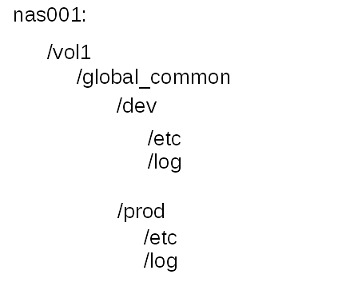
There are binary, configuration and log data on a filesystem to be shared. Below is a diagram for implementing a logical filesystem supporting your homogeneous utility set.

I create the automount map supporting this directory structure with embedded tokens on the “Shared on like OS variant” subdirectories that give identity to the OS variant. The size is fairly small. I simplify by storing all these mounts on the same volume. By doing this, you can replicate between sites, which will yield a consistent deployment as well as provide for your disaster recovery plan. I also provide for a pre-production mount as well. The “Shared on all OS variants” exist on a shared filesystem that is replicated for disaster recovery, but not used at other sites. Below is a sample for structuring the filesystem share.
Shared on All Hosts
Shared on All Like OS Variants
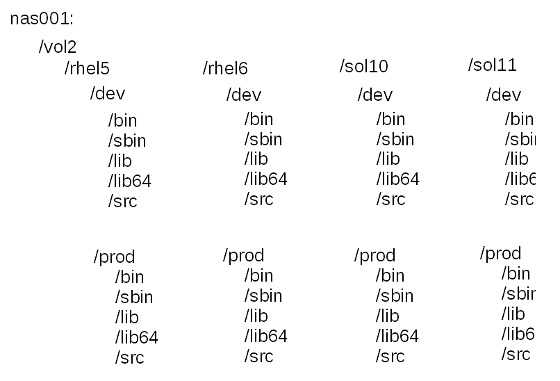
Here is a sample indirect automap defining the key value pairs supporting mount point /global that is stored in the “auto.global” map.
| Key |
Value |
etc |
nas001:/vol1/global_common/$ENVN/etc |
log |
nas001:/vol1/global_common/$ENVN/log |
bin |
nas001:/vol2/$OSV/$ENVN/bin |
sbin |
nas001:/vol2/$OSV/$ENVN/sbin |
lib |
nas001:/vol2/$OSV/$ENVN/lib |
lib64 |
nas001:/vol2/$OSV/$ENVN/lib64 |
Embedded tokens are resolved through the client automounter configuration. For Linux this is done either in the /etc/auto.master file or in the /etc/sysconfig/autofs (RedHat). This is a sample for configuring in the /etc/auto.master configuration file.
/global -DOSV=rhel5,-DENVN=prod auto.global
This is what would be added to /etc/sysconfig/autofs configuration file. Note that this affects all entries where /etc/auto.master affects only the single map referenced.